
showcase · interface tour
chessdroid — everything inside
▸ LATEST FEATURES!

Chess runs deep.

Deep engine analysis, tactical and endgame drills, 5.94 million training puzzles, bot play with real Elo targeting, simultaneous engine tournaments, six app themes, 22 piece sets — all offline, no account, no distractions.
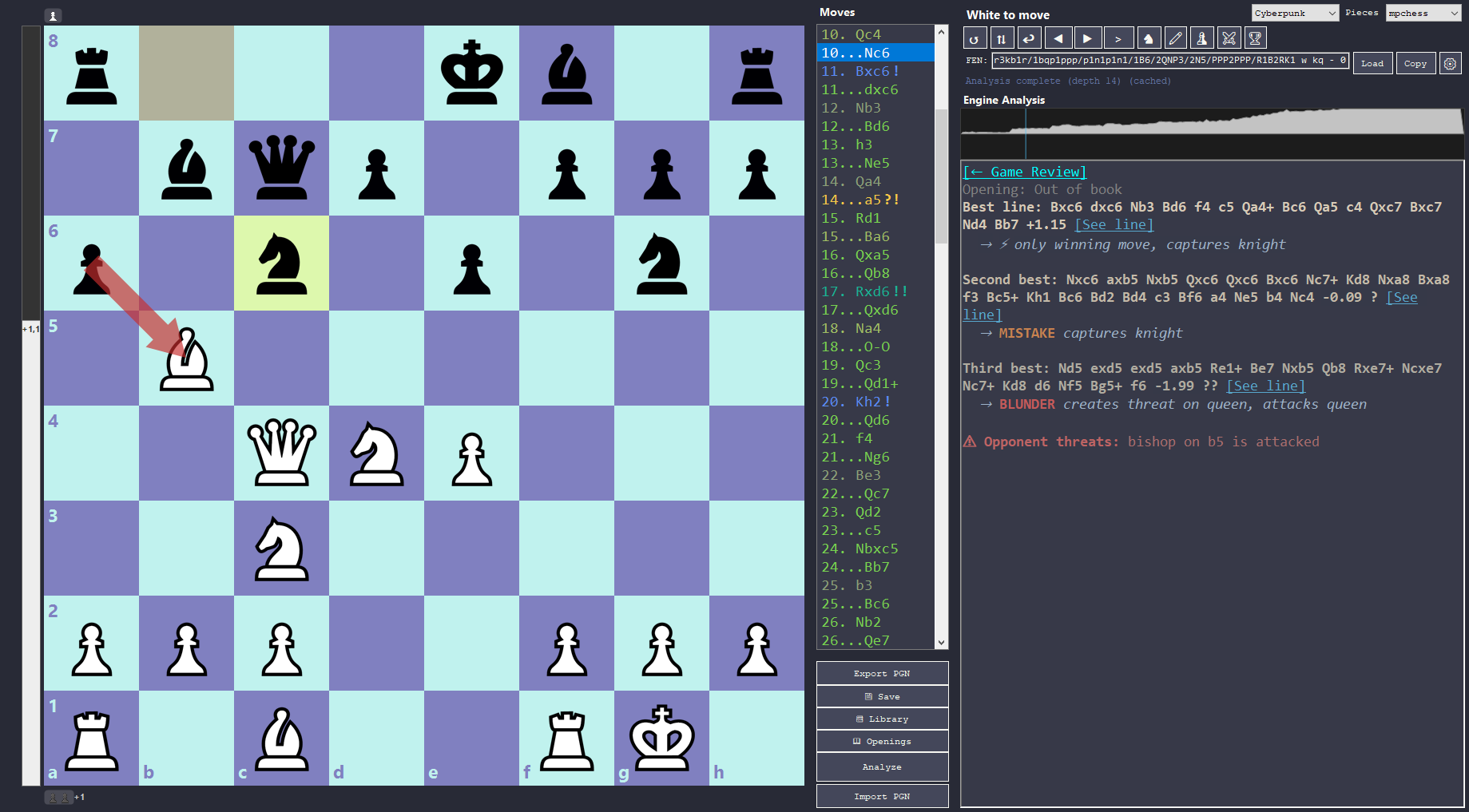
chessdroid — screenshot
chessdroid Analysis Board interface
Interface Breakdown — 20 items
1

Interactive Chess Board

Click or drag pieces to make moves. The evaluation bar on the left shows the position assessment in real time. Engine arrows visualize recommended moves right on the squares, and you can draw your own with right-click drag.

  • Click-to-move and drag-to-move interface
  • Live evaluation bar with numerical display and smooth animation
  • Colored engine arrows (green/yellow/red) for best moves
  • Red threat arrows showing opponent's active threats
  • Free-draw arrows with right-click — annotate anything
  • Book move arrows from the opening database
  • Flip board, last-move highlight, square labels
  • Automatic analysis on every move — no buttons to press
2

Move List & Navigation

Every move is recorded in a scrollable list with color-coded quality symbols. Click any move to jump to that position instantly. Navigate with arrow keys or the nav buttons.

  • Full game history with move numbers and quality badges
  • Click any move to jump to that position
  • Variation branching — explore alternative lines at any point
  • Eval graph: click any point to jump directly to that move
3

Engine Analysis Output

Deep position analysis with Win/Draw/Loss probabilities, opening recognition, book moves, and up to three best lines. Evaluations are color-coded (lime/green), clickable to load the line into the move tree, and long lines are truncated with an expandable "..." for a clean view.

  • Opening name with ECO code and grandmaster book moves
  • Up to 3 principal variations with full tactical explanations
  • Clickable eval loads the PV into the move tree as a variation branch
  • Lines truncated to 10 half-moves — click "..." to expand inline
  • Threats created, defenses provided, and positional insights per move
4

Move Classification & Game Review

Classify an entire game with a single click. Every move gets a quality label — from Brilliant to Blunder — with accuracy scores for both sides. The interactive game review panel shows quality counts you can click to navigate directly to the first move of each type.

  • Brilliant (!!): Piece sacrifice leading to a winning position
  • Precise (!): The only move that wins or saves the position
  • Best / Excellent / Good / Book
  • Inaccuracy (?!) / Mistake (?) / Blunder (??): Losing 5%–20%+ win probability
  • White and Black accuracy scores (Lichess formula)
5

Tactical Pattern Detection

Automatically identifies the tactical patterns created or present in a position — explained in plain language alongside the engine's best lines.

  • Forks, pins, skewers, discovered attacks, X-ray attacks
  • Deflection, decoy, overloading, desperado
  • Double check, back-rank mate, smothered mate
  • Hanging pieces, undefended pieces, trapped pieces
  • Defense detection: blocks, escapes, protections
6

Play vs Bot

Challenge an engine directly on the analysis board. Set a target Elo (1320–3190) or pick a preset — Beginner, Club, Advanced, Expert. The bot uses UCI Elo limiting for engines that support it, with Skill Level as a fallback. Draw detection handles threefold repetition, insufficient material, and the 50-move rule.

  • Elo input from 1320 to 3190 — direct, no abstract level tiers
  • Friendly or Challenge mode (Challenge hides engine lines)
  • Board auto-flips when playing as Black
  • Take Back goes back 2 moves (your move + bot's response)
  • Works with any UCI engine: Stockfish, Ethereal, Berserk, and more
7

Engine vs Engine Matches

Run engine matches with series support, adjudication, auto-save, and a neutral arbiter for accurate eval annotation. Choose from Depth, Time/move, or Clock time controls. An opening book mode (Random or Choose from ECO) keeps games varied.

  • Series mode — play N games, colors swap each game
  • Auto-adjudication when one side has a decisive advantage
  • Neutral arbiter engine annotates evals independently of the players
  • Opening book: Random (weighted Polyglot) or Choose (ECO explorer)
  • PGN auto-saved with engine names, evals, and time annotations
  • Chessdroid Rating ladder — K=32, seeded from CCRL, persistent
8

Tournament Mode

Run simultaneous engine-vs-engine matches across a live 2×2 board grid. Round-robin auto-generates all pairings; Manual mode lets you set up to 4 custom pairs. Click any board to expand it for detailed analysis. Live standings track Score, Wins, Draws, Losses.

  • Up to 4 simultaneous matches on a live board grid
  • Round-robin or Manual pairing modes
  • Click to expand any board — eval bar + move log appear
  • Live standings table with score tracking
  • Tournament results auto-saved with full PGN of all games
  • Shared annotator engine on the focused board
9

Puzzle Training

Train with the full Lichess puzzle database — 5.94 million puzzles, available in the separate puzzle pack. Filter by theme (tactical patterns), rating band (Beginner to Master), or opening. Three sub-modes keep training fresh: Standard, Rush, and Gauntlet.

  • Standard: Solve puzzles, track streak, accuracy %, and personal bests
  • Rush: Solve as many as possible before the timer runs out (1–5 min)
  • Gauntlet: One wrong move ends the run — how far can you go?
  • Daily Puzzle: Same puzzle for everyone, every day — streak tracking
  • Filter by 40+ themes, 5 rating bands, or 22 openings
  • Hint button highlights the piece to move (amber, no spoiler)
10

Endgame & Tactics Drills

Load curated study positions from 10 PGN files covering rook endgames, named checkmate patterns, pins, back-rank tactics, forks, and discovered attacks. Every chapter includes a description explaining the key idea. Practice the position against the bot directly from the drill panel.

  • 10 drill files: 5 tactics + 4 endgame series + rook endgame database
  • 38 named checkmate patterns, 18 fork types, 14 back-rank positions
  • Rook endgame database: Lucena, Philidor, Vančura, 28 real game positions
  • Hover preview — see the position before loading
  • Practice vs Bot — play from the drill FEN against the engine
  • Watch Engines — let two engines play the drill position
11

Opening & Vision Training

Two more training modes targeting memory and board awareness. Opening Training plays through an opening line automatically, then locks the board and asks you to recreate it from memory. Board Vision trains square-color recognition on a blank monochrome board.

  • Opening Training: Watch phase → recreate phase → hint (amber FROM square)
  • Board Vision: Training, Timed (1/3/5 min global), and Survival (3 lives) sub-modes
  • Square Training: Square name recognition drills (Easy / Challenge, all colors)
  • Personal bests persisted per mode and sub-mode
  • Per-section reset links — granular control over your records
12

App Themes & Visual Effects

Six full UI themes change the color of every panel, button, and console output at once. Four board visual effects add depth and polish on top of your chosen board color.

  • 6 themes: Dark, Light, Cyberpunk, Dracula, Nord, Sepia
  • Gradient board: Subtle tonal gradient across the squares
  • Vignette: Darkened edges to draw focus to the center
  • Piece glow: Soft aura behind each piece
  • Board frame: Configurable wood/colored border around the board
13

22 Piece Sets

Switch between 22 curated piece sets — all SVG-rendered for crisp scaling at any board size. A live hover preview in the dropdown shows each set on the board before you commit. The setting saves instantly.

  • Includes: alpha, anarcandy, california, cardinal, celtic, chess7, Chess.com, chessnut, companion, fresca, gioco, icpieces, leipzig, letter, Lichess, maestro, merida, mpchess, pixel, staunty, tatiana, totoy
  • SVG rendering — crisp at any board size
  • Live hover preview in the dropdown before selecting
14

Board Colors & Presets

Pick any square color from a full RGB color picker, or choose from 16 curated presets. A live hover preview shows each preset on the board as you browse. Your choice saves instantly and applies without restarting.

  • 16 presets: Brown, Green, Blue, Cyberpunk, Midnight, Forest, Walnut, Arctic, Pink Soldier, Sungrass, Space Traveler, Atlantis, and more
  • Full RGB picker for light and dark squares independently
  • Live hover preview in the board color dropdown
15

Engine Profiles & Chessdroid Rating

Assign a display name and CCRL Elo to each engine EXE. chessdroid maintains a separate persistent rating ladder (K=32) updated after every match — seeds from CCRL on first game, then evolves based on results.

  • Per-engine display name and CCRL Elo in the profiles dialog
  • Chessdroid Rating shown in match output and profiles — grows with play
  • Reset Chessdroid Rating per engine independently
  • Engine names and Elos shown in match headers and standing tables
16

Sound Effects

Every action on the board has a matching sound. Move, capture, check, checkmate, and castling all play distinct audio cues. The castle sound is a double tap with a gap — no dedicated file needed. All sounds are volume-normalized.

  • Move, capture, check, and game-over sounds
  • Castling: double move sound with 70ms gap between the two pieces
  • Toggle on/off in Settings — no restart needed
  • Forward navigation and engine match moves also play sounds
17

Play Style Recommendations

Set your preferred playing style from Very Solid to Very Aggressive. When a move matches your style better than the engine's top choice, a Recommended section shows the style-based alternative with the same full tactical breakdown.

  • Aggressiveness slider 0–100 (Very Solid → Very Aggressive)
  • Style-based recommendations with complete explanations
  • Only appears when style diverges from the engine's top pick
18

PGN Import & Export

Import games from any source in standard PGN format — including multi-game PGN files. A game picker dialog lets you choose which game to load from a file with many games. Export your analysis with quality annotations baked in.

  • Multi-game PGN picker: #/White/Black/Result/Moves/Date columns
  • Annotated export: quality symbols and comments round-trip through PGN
  • Supports FEN starting positions for non-standard openings
  • Game Library: save, load, and rename analyzed games as JSON
19

Continuous Analysis

Watch the engine think in real time. Streams raw PV lines depth by depth — each update shows depth, evaluation, and up to 3 candidate moves. Once it hits max depth, the full annotated result appears with explanations and clickable eval lines.

  • Live depth-by-depth PV streaming
  • Full annotated analysis at max depth (with explanations)
  • Configurable max depth in Settings (default 50, range 10–100)
20

Piece Animations & Board Layout

Pieces glide smoothly to their destination squares. Castling animates the rook. Speed is fully configurable. The resizable three-panel layout (Board | Moves | Analysis) is independently draggable so you can adapt it to any screen size.

  • Smooth GDI+ lerp animation — no stutter, no threads
  • Castling: rook slides, king snaps into place
  • Speed configurable 50–500ms; toggle on/off anytime
  • Three-panel layout with independent splitter handles
  • Material strips above and below the board
Ready to analyze?

Ready to analyze?

Download chessdroid and start exploring your games with the Analysis Board.